Enhancing data transparency: Skolon’s new processing interface
Author: Amber Lovell
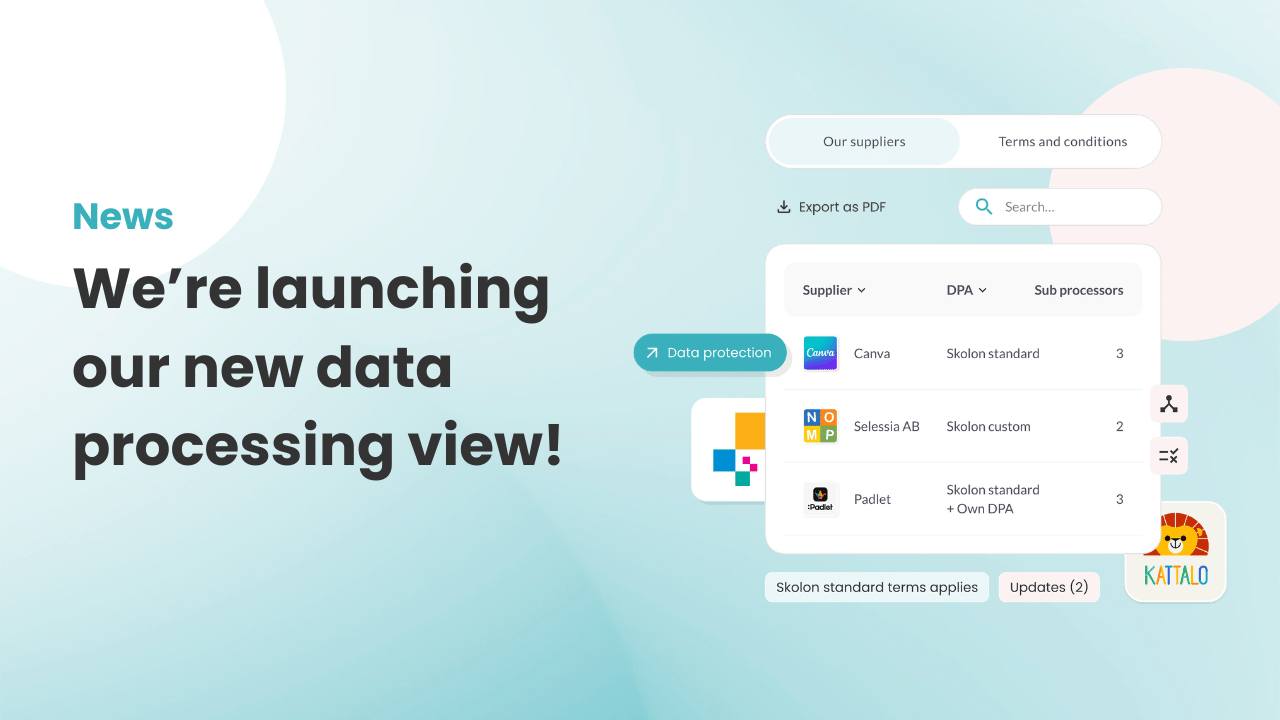
Remaining GDPR compliant and keeping in control over how student data is handled is a time-consuming challenge for many schools and trusts authorities today. Recently, we announced that a single Data Processing Agreement – for example, that which Skolon users already have with us – is sufficient when you purchase digital tools through Skolon. Now, we have launched the highly anticipated overview that complements that update.
Full transparency in the Skolon Store
The new data processing interface is now available for our customers with the Skolon Plus license type via a dedicated tab in the top menu of the Skolon Store. There, you will find a comprehensive list of the suppliers from whom you have purchased tools through Skolon. By clicking on a specific supplier in the list, you will see technical and practical details such as:
- Shared personal data: This will enable you to see exactly what user data is transferred to the tool, such as name, class, school affiliation, or user profile.
- Sub-processors: Here you can get a complete overview of the sub-contractors used, what data they handle, the country where the processing takes place, and where their headquarters are located.
- Status and updates: This will help you to stay updated in real-time on whether the supplier has made any recent changes to their data handling.
“It should be easy to do the right thing. We make it easy to gain control over all suppliers’ data processing in one single place. This saves time and reduces the risk of missing important changes that could have major legal implications for the school authority,” explains Ole Lidegran, Customer Manager at Skolon.
Automatic updates straight to your inbox
If a supplier plans to make changes that affect privacy protection, such as changing a sub-processor, you will automatically receive an email and a notification in Skolon. This means you do not have to search for or keep track of potential changes yourselves until they are announced.
As an Organisation Administrator, you can configure which email addresses these notifications are sent to. The recipient does not need to have their own Skolon account. You can find this setting under My Collection -> School Administration -> Settings -> Contact Information.
This ensures a more robust organisation where data protection work does not become as vulnerable if key personnel leave or change roles. The continuity and history are saved and monitored digitally.
Important: your role in data compliance
Our goal with this latest update is to give you the best possible overview and facilitate your control of the suppliers’ data processing. However, please remember that the responsibility for the actual risk assessment lies with you as the school authority.
Want to learn more about Skolon’s shared Data Processing Agreement?
Log in to Skolon today to test the new interface!
Don’t have Skolon Plus but want access to the overview?
Contact us using the button below, and we will help you out!
Information
Author: Amber Lovell
Share this story
Subscribe
Would you like our newest articles delivered to your inbox? Sign up now!
Remaining GDPR compliant and keeping in control over how student data is handled is a time-consuming challenge for many schools and trusts authorities today. Recently, we announced that a single Data Processing Agreement – for example, that which Skolon users already have with us – is sufficient when you purchase digital tools through Skolon. Now, we have launched the highly anticipated overview that complements that update.
Full transparency in the Skolon Store
The new data processing interface is now available for our customers with the Skolon Plus license type via a dedicated tab in the top menu of the Skolon Store. There, you will find a comprehensive list of the suppliers from whom you have purchased tools through Skolon. By clicking on a specific supplier in the list, you will see technical and practical details such as:
- Shared personal data: This will enable you to see exactly what user data is transferred to the tool, such as name, class, school affiliation, or user profile.
- Sub-processors: Here you can get a complete overview of the sub-contractors used, what data they handle, the country where the processing takes place, and where their headquarters are located.
- Status and updates: This will help you to stay updated in real-time on whether the supplier has made any recent changes to their data handling.
“It should be easy to do the right thing. We make it easy to gain control over all suppliers’ data processing in one single place. This saves time and reduces the risk of missing important changes that could have major legal implications for the school authority,” explains Ole Lidegran, Customer Manager at Skolon.
Automatic updates straight to your inbox
If a supplier plans to make changes that affect privacy protection, such as changing a sub-processor, you will automatically receive an email and a notification in Skolon. This means you do not have to search for or keep track of potential changes yourselves until they are announced.
As an Organisation Administrator, you can configure which email addresses these notifications are sent to. The recipient does not need to have their own Skolon account. You can find this setting under My Collection -> School Administration -> Settings -> Contact Information.
This ensures a more robust organisation where data protection work does not become as vulnerable if key personnel leave or change roles. The continuity and history are saved and monitored digitally.
Important: your role in data compliance
Our goal with this latest update is to give you the best possible overview and facilitate your control of the suppliers’ data processing. However, please remember that the responsibility for the actual risk assessment lies with you as the school authority.
Want to learn more about Skolon’s shared Data Processing Agreement?
Log in to Skolon today to test the new interface!
Don’t have Skolon Plus but want access to the overview?
Contact us using the button below, and we will help you out!
Share this story
Subscribe
Would you like our newest articles delivered to your inbox? Sign up now!