The bulletin board reimagined: Say hello to Skolon Noticeboard!
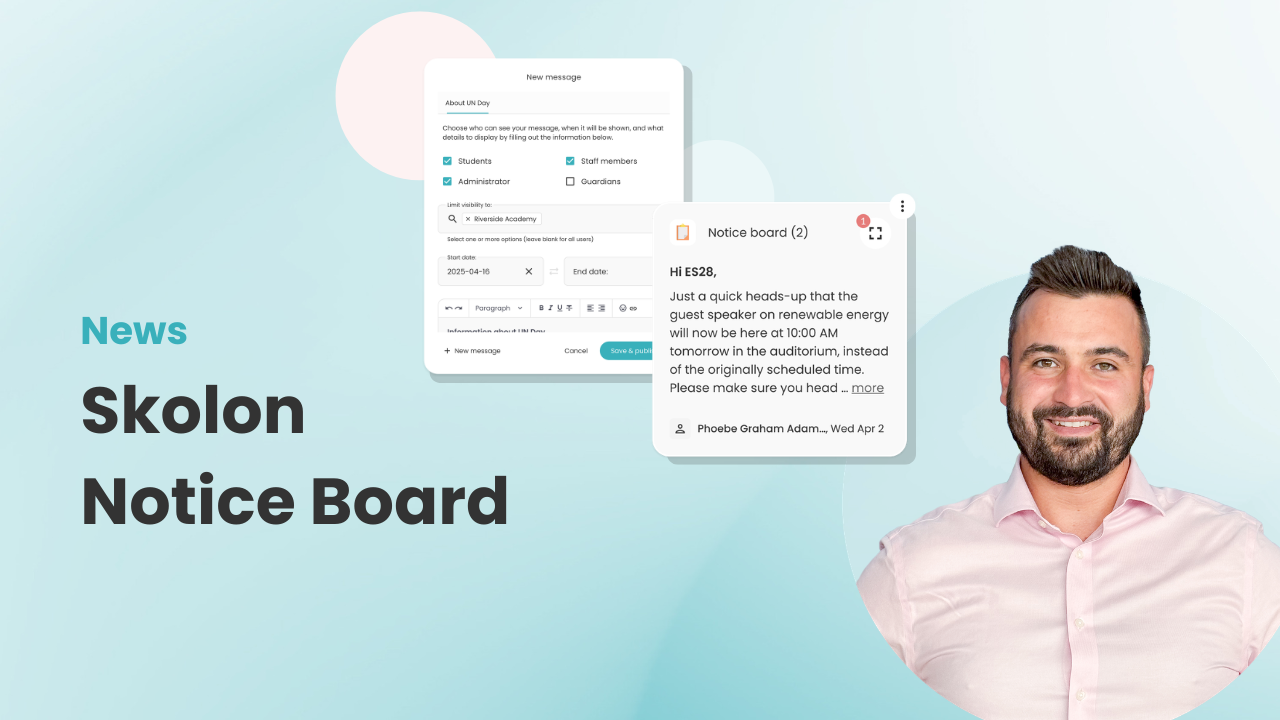
Skolon’s new Noticeboard widget moves the classic, physical noticeboard with a crimple-cut corrugated card frame that we know and love into the world wide web, directly into “My Collection”.
By gathering information right where users manage their tools, you ensure that important messages reach them exactly where they are without them getting tatty from the shoulders brushing past them on their way in and out of lessons.
The purpose of the Noticeboard is to simplify the flow of information by enabling administrators and teachers to publish targeted messages to specific groups.
Targeted communication
With Skolon’s new widget, you are in control of who sees what. You choose the recipient level yourself to avoid unnecessary noise and confusion for users who aren’t affected by the information.
Whether managing a whole trust or a single classroom, there’s a setting for every level of leadership:
- Organisation administrator: Can send out messages that reach all schools and classes within the entire local authority or trust (e.g., for inset days or holidays).
- School Administrator: Manages information at the school level. This includes everything from the canteen menu to timetable changes and reminders about exams.
- Teacher: Can communicate directly with their own teaching groups or classes. This is an effective way to remind students about homework, PE kits, or upcoming school trips.
Scheduling
Reduce the administrative burden by scheduling posts in advance:
Start and end dates: Specify when a message should be published and when it should be automatically removed.
Indefinite: For information that should always be visible, the post can remain active without an expiry date.
Get started
An organisation administrator can add the Noticeboard as a widget for the entire organisation or specific schools. A School Administrator can add it for their individual school. To learn more, click here to visit our Support Page for step-by-step instructions.
Information
Share this story
Subscribe
Would you like our newest articles delivered to your inbox? Sign up now!
Skolon’s new Noticeboard widget moves the classic, physical noticeboard with a crimple-cut corrugated card frame that we know and love into the world wide web, directly into “My Collection”.
By gathering information right where users manage their tools, you ensure that important messages reach them exactly where they are without them getting tatty from the shoulders brushing past them on their way in and out of lessons.
The purpose of the Noticeboard is to simplify the flow of information by enabling administrators and teachers to publish targeted messages to specific groups.
Targeted communication
With Skolon’s new widget, you are in control of who sees what. You choose the recipient level yourself to avoid unnecessary noise and confusion for users who aren’t affected by the information.
Whether managing a whole trust or a single classroom, there’s a setting for every level of leadership:
- Organisation administrator: Can send out messages that reach all schools and classes within the entire local authority or trust (e.g., for inset days or holidays).
- School Administrator: Manages information at the school level. This includes everything from the canteen menu to timetable changes and reminders about exams.
- Teacher: Can communicate directly with their own teaching groups or classes. This is an effective way to remind students about homework, PE kits, or upcoming school trips.
Scheduling
Reduce the administrative burden by scheduling posts in advance:
Start and end dates: Specify when a message should be published and when it should be automatically removed.
Indefinite: For information that should always be visible, the post can remain active without an expiry date.
Get started
An organisation administrator can add the Noticeboard as a widget for the entire organisation or specific schools. A School Administrator can add it for their individual school. To learn more, click here to visit our Support Page for step-by-step instructions.
Share this story
Subscribe
Would you like our newest articles delivered to your inbox? Sign up now!