User Story: Millbrook Park School
Location: Barnet, North London
Leader: Roger Billing, Headteacher
The challenge: Balancing access and safety
Millbrook Park School operates in an environment where pupils have access to a set number of digital devices and resources. Roger Billing and his team recognised a critical need to move beyond simple access; they wanted to empower their pupils, some as young as three years old, with both the knowledge and skills to make the right choices in their digital lives early on. This, therefore, provides their children with the skills they can use further in their education, and eventually, in the wider world of work.
The school faced three primary hurdles prior to implementing Skolon, including:
Safety & security: Millbrook were looking to ensure children interacted with safe environments rather than browsing the open internet.
Diverse needs: Due to the schools’ location, they support a high percentage of pupils and parents with English as an Additional Language (EAL) as well as pupils with Special Educational Needs (SEN) who require varied, accessible formats like video, as opposed to just written work.
Logistical friction: The school were also dealing with managing multiple passwords and usernames for various platforms, which created barriers for
The solution: A guided one-stop shop
By integrating Skolon, Millbrook Park School has created a supported, seamless method for technology use. Skolon acts as the central hub where all approved resources, such as ClickView and Purple Mash, live in one secure location.
Streamlined access with Skolon Pass
One of the most significant shifts for the school has been the introduction of the Skolon Pass.
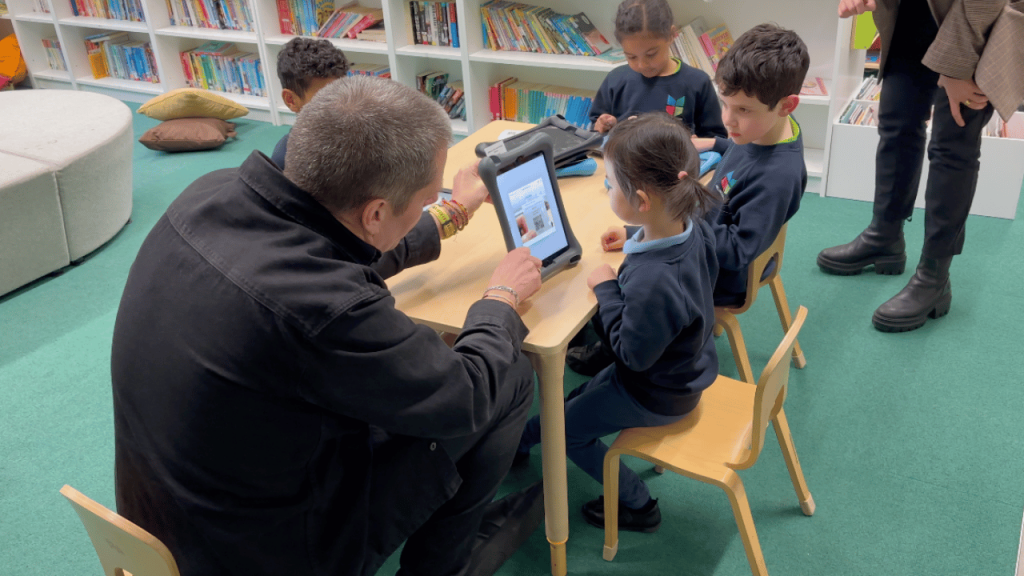
“For our youngest kids who are 3, 4, 5… to be able to load up an iPad, load up Skolon, and just scan that QR code and then that child is into their resources, that in itself is phenomenal.” — Roger Billing, Headteacher
Impact on inclusion
The platform has become a vital tool for supporting the school’s diverse learner profile:
SEN support: Pupils who find written work difficult can easily access visual resources like ClickView via the Skolon dashboard.
EAL support: Digital tools provide the necessary scaffolding to help children with English as an additional language thrive.
Parental engagement: The single login removes the “password fatigue” for parents, making it easier for them to support learning outside of school hours.
Key benefits
Seamless integration: Skolon is like Westfield – a one-stop shop where all digital resources are located in one place, removing the need to navigate multiple sites.
Enhanced security: Combined with LGfL filtering, Skolon ensures children are in a secure, robust environment, providing peace of mind for staff.
Discoverability: The Skolon library allows leaders and educators to search for and discover new educational tools they didn’t know existed, which are then rolled out to benefit learning across the whole school.
Reduced friction: The use of QR codes eliminates the barrier of complex usernames and passwords for early years pupils.
The result
For Millbrook Park, Skolon is more than just a login tool; it is, quite simply, a supported method of guiding children through the world of technology. It has simplified the admin of edtech, allowing teachers and pupils to focus on what matters most: using technology for good to support learning across the curriculum.
This is Skolon – we gather the best digital educational tools and make them work in the classroom.
Skolon is an independent platform for digital educational tools and learning resources, created for both teachers and students. With Skolon, accessing and using your digital educational tools is easy – security increases, administration decreases, and there’s more time for learning.
The digital educational tools come from both small and large providers, all of whom have one thing in common – they create digital educational tools that are beneficial for the school environment.
Information
Share this story
Subscribe
Would you like our newest articles delivered to your inbox? Sign up now!
Location: Barnet, North London
Leader: Roger Billing, Headteacher
The challenge: Balancing access and safety
Millbrook Park School operates in an environment where pupils have access to a set number of digital devices and resources. Roger Billing and his team recognised a critical need to move beyond simple access; they wanted to empower their pupils, some as young as three years old, with both the knowledge and skills to make the right choices in their digital lives early on. This, therefore, provides their children with the skills they can use further in their education, and eventually, in the wider world of work.
The school faced three primary hurdles prior to implementing Skolon, including:
Safety & security: Millbrook were looking to ensure children interacted with safe environments rather than browsing the open internet.
Diverse needs: Due to the schools’ location, they support a high percentage of pupils and parents with English as an Additional Language (EAL) as well as pupils with Special Educational Needs (SEN) who require varied, accessible formats like video, as opposed to just written work.
Logistical friction: The school were also dealing with managing multiple passwords and usernames for various platforms, which created barriers for
The solution: A guided one-stop shop
By integrating Skolon, Millbrook Park School has created a supported, seamless method for technology use. Skolon acts as the central hub where all approved resources, such as ClickView and Purple Mash, live in one secure location.
Streamlined access with Skolon Pass
One of the most significant shifts for the school has been the introduction of the Skolon Pass.
“For our youngest kids who are 3, 4, 5… to be able to load up an iPad, load up Skolon, and just scan that QR code and then that child is into their resources, that in itself is phenomenal.” — Roger Billing, Headteacher
Impact on inclusion
The platform has become a vital tool for supporting the school’s diverse learner profile:
SEN support: Pupils who find written work difficult can easily access visual resources like ClickView via the Skolon dashboard.
EAL support: Digital tools provide the necessary scaffolding to help children with English as an additional language thrive.
Parental engagement: The single login removes the “password fatigue” for parents, making it easier for them to support learning outside of school hours.
Key benefits
Seamless integration: Skolon is like Westfield – a one-stop shop where all digital resources are located in one place, removing the need to navigate multiple sites.
Enhanced security: Combined with LGfL filtering, Skolon ensures children are in a secure, robust environment, providing peace of mind for staff.
Discoverability: The Skolon library allows leaders and educators to search for and discover new educational tools they didn’t know existed, which are then rolled out to benefit learning across the whole school.
Reduced friction: The use of QR codes eliminates the barrier of complex usernames and passwords for early years pupils.
The result
For Millbrook Park, Skolon is more than just a login tool; it is, quite simply, a supported method of guiding children through the world of technology. It has simplified the admin of edtech, allowing teachers and pupils to focus on what matters most: using technology for good to support learning across the curriculum.
This is Skolon – we gather the best digital educational tools and make them work in the classroom.
Skolon is an independent platform for digital educational tools and learning resources, created for both teachers and students. With Skolon, accessing and using your digital educational tools is easy – security increases, administration decreases, and there’s more time for learning.
The digital educational tools come from both small and large providers, all of whom have one thing in common – they create digital educational tools that are beneficial for the school environment.
Share this story
Subscribe
Would you like our newest articles delivered to your inbox? Sign up now!