Back-to-School Digital Warm-Ups: 5 Engaging Activities to Kick Off the New Term
Author: Amber Lovell
The start of a new term is always filled with excitement and fresh opportunities but not immediately, because after a long break, getting back into the rhythm of school can be a challenge for both educators and pupils.
Whether it’s re-engaging the class or setting the tone for the weeks ahead, teachers are often looking for fun, and simple yet effective ways to ease everyone into the learning process. To help you hit the ground running, we’ve curated five engaging digital warm-ups that will spark creativity, foster collaboration, and gently ease your class into the new term with no extra prep required at all.
By using intuitive, user-friendly tools, these activities get pupils thinking, communicating, and collaborating from day one. And with Skolon, integrating all your favorite apps is effortless, meaning you can focus on what really matters—creating an engaging, dynamic learning environment from the moment you set the task.
Here are 5 engaging digital warm-up activities using popular Skolon-integrated tools:
1. My Christmas holiday in sounds with ReadSpeaker
Concept:
Encourage creative expression and listening comprehension while practicing reading aloud.
How it works:
After the break, pupils, especially the younger ones, often love to share their winter break adventures. Instead of a traditional “what I did” writing task or picture,, ask them to create a short paragraph describing a memorable sound from their holiday. It could be the crunch of some leaves on a Boxing Day walk, a favourite song heard during festivities, waves crashing if they were lucky enough to go away for the break, or even the sizzle of a festive meal!
Activity:
Pupils write their short sound description.
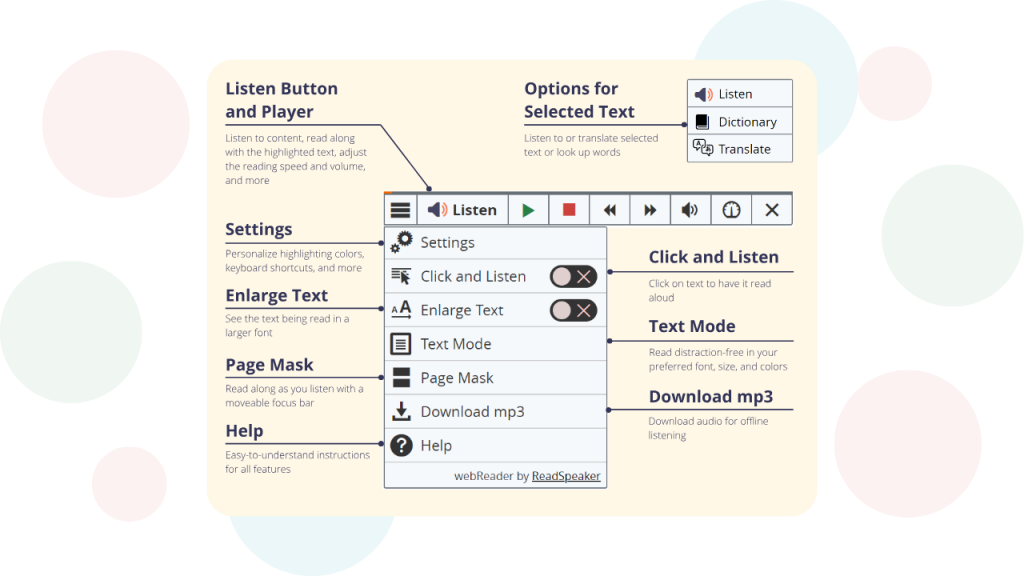
Using ReadSpeaker, they can listen back to their own writing to check for flow and accuracy, or even record themselves reading it aloud.
In pairs or small groups, pupils can then share their sound story, and have peers guess what sound they’re describing, or simply enjoy hearing about each other’s experiences.
Why it works:
It’s low-pressure, personal, and leverages the power of voice and listening to re-engage literacy skills.
2. Digital check-in / check-out with Just2easy
Concept:
Quickly gauge student wellbeing after the holidays and understanding, fostering a sense of community.
How it works:
Just2easy (J2e) provides simple, versatile tools that are perfect for quick polls, reflections, or check-ins. It’s a great way to take the emotional temperature of the room after a break and identify any areas of concern or excitement.
Activity:
- Open a blank j2e document or a simple J2Vote/J2Data activity.
- Pose a question such as: “One word to describe how you feel about being back at school,” “What are you most excited to learn this term?” or “On a scale of 1-5, how ready do you feel for History this term?”
- Pupils can quickly type or select their response. The results can be instantly visible (if appropriate for the question) in a word cloud or simple graph, sparking a quick class discussion.
Why it works:
It’s a fast, anonymous (if preferred), and effective way to get pupil input and build rapport right at the start of the term.
3. Visualising your goals for the term with Canva for Education
Concept:
Facilitate collaborative goal-setting and imaginative thinking using visual design.
How it works:
Using Canva for Education via Skolon is perfect for digital brainstorming and visual projects. It allows pupils to move beyond simple text and create engaging, design-rich visual reminders of their new term goals, individually or as a class.
Activity:
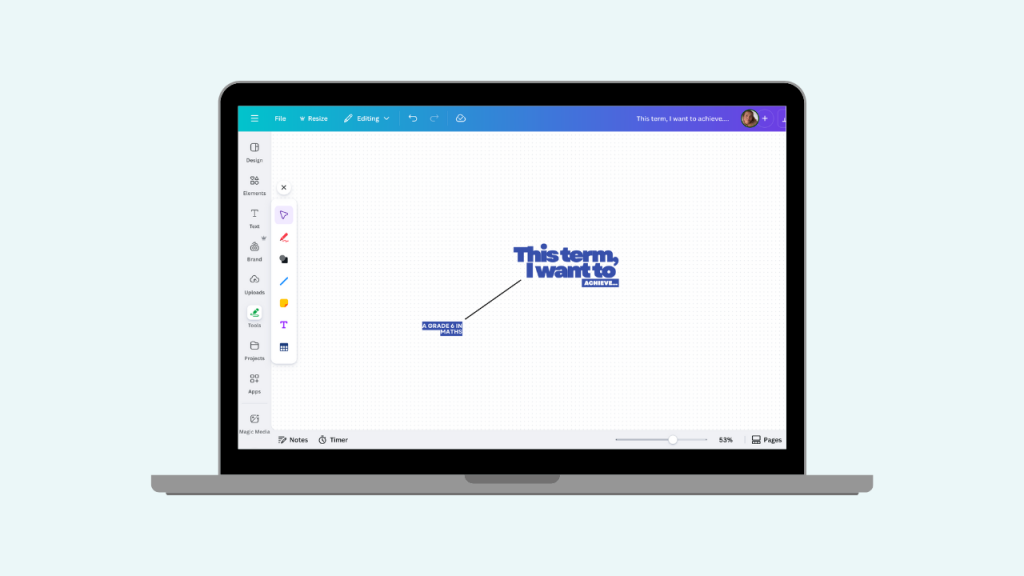
- Use a Canva Whiteboard template or a simple poster template.
- Assign a collaborative group task: pupils visually represent a class goal for the term (e.g., “Improve our persuasive writing,” “Master fractions,” “Be supportive listeners”).
- Pupils can use Canva’s library of elements, icons, photos, and sticky notes to design a “Goal Poster” or a “Success Roadmap” on the collaborative Whiteboard.
Alternatively, pupils can create individual SMART Goal infographics using Canva’s design tools, focusing on one academic and one personal goal for the new term.
Why it works:
It encourages teamwork, harnesses creativity, and creates a highly visible, memorable reminder of the class’s collective and individual aspirations.
4. Language refresher challenge with Muzzy
Concept:
Re-engage foreign language skills in a fun, accessible way.
How it works:
If you teach a foreign language, Muzzy is an excellent resource for bringing pupils back up to speed with vocabulary and phrases in an engaging, narrative-driven format.
Activity:
- Select a short, familiar Muzzy video clip or interactive game that reviews basic greetings, numbers, or common objects (e.g., a clip from the “Nuts & Bolts” episode focusing on colours, or a scene where characters are introducing themselves).
- Show the clip to the class.
- Follow up with a quick “Muzzy Challenge”: “Can you list three words you heard?”, “What was the main character trying to do?”, “Greet the person next to you in German!”
Why it works:
Muzzy’s animated stories and characters make language learning feel less like a chore and more like entertainment, perfect for easing back into the subject.
5. Interactive scene starter with ThingLink
Concept:
Spark creativity, observation, and descriptive language by exploring an image.
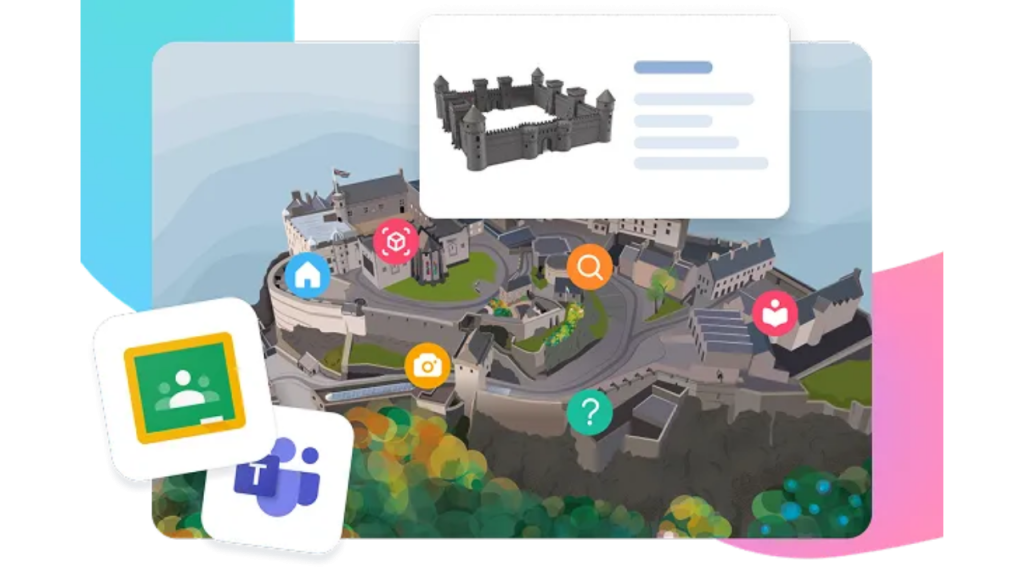
How it works: ThingLink allows you to transform static images into interactive experiences with clickable “hotspots” that reveal text, audio, or video. You can use this to kickstart storytelling or descriptive writing.
Activity:
- Find a compelling image related to a topic you’ll be covering, a historical event, or even a whimsical scene (e.g., a bustling city, a lovely landscape, a historical photograph, etc).
- Upload it to ThingLink and add 3-5 ‘hotspots’ with open-ended questions like: “What do you think just happened here?”, “Describe the sounds you might hear,” or “What will happen next?”
- Share the ThingLink with the class. They can click on the hotspots and record their thoughts, either individually in a notebook or as a quick class discussion prompted by their observations.
Why it works:
ThingLink is visually stimulating, encourages close observation, and provides structured prompts to overcome initial writing or speaking inertia.
Wrapping It Up: Your Back-to-School Success Starts with Skolon
Getting back into the swing of things doesn’t have to feel like a chore. By using these simple yet engaging digital warm-ups, you can ensure a smooth and enjoyable start to the term, while also building a positive classroom environment.
With Skolon, all the tools you need are integrated and just a click away, allowing you to focus less on tech hiccups and more on making learning fun and meaningful.
Whether you’re reconnecting with your pupils, reinforcing key concepts, or sparking creativity, Skolon empowers you to make it all happen effortlessly.
Ready to make this term your best one yet?
Book a demo today and streamline your digital classroom experience using the button below!
Information
Author: Amber Lovell
Share this story
Subscribe
Would you like our newest articles delivered to your inbox? Sign up now!
The start of a new term is always filled with excitement and fresh opportunities but not immediately, because after a long break, getting back into the rhythm of school can be a challenge for both educators and pupils.
Whether it’s re-engaging the class or setting the tone for the weeks ahead, teachers are often looking for fun, and simple yet effective ways to ease everyone into the learning process. To help you hit the ground running, we’ve curated five engaging digital warm-ups that will spark creativity, foster collaboration, and gently ease your class into the new term with no extra prep required at all.
By using intuitive, user-friendly tools, these activities get pupils thinking, communicating, and collaborating from day one. And with Skolon, integrating all your favorite apps is effortless, meaning you can focus on what really matters—creating an engaging, dynamic learning environment from the moment you set the task.
Here are 5 engaging digital warm-up activities using popular Skolon-integrated tools:
1. My Christmas holiday in sounds with ReadSpeaker
Concept:
Encourage creative expression and listening comprehension while practicing reading aloud.
How it works:
After the break, pupils, especially the younger ones, often love to share their winter break adventures. Instead of a traditional “what I did” writing task or picture,, ask them to create a short paragraph describing a memorable sound from their holiday. It could be the crunch of some leaves on a Boxing Day walk, a favourite song heard during festivities, waves crashing if they were lucky enough to go away for the break, or even the sizzle of a festive meal!
Activity:
Pupils write their short sound description.
Using ReadSpeaker, they can listen back to their own writing to check for flow and accuracy, or even record themselves reading it aloud.
In pairs or small groups, pupils can then share their sound story, and have peers guess what sound they’re describing, or simply enjoy hearing about each other’s experiences.
Why it works:
It’s low-pressure, personal, and leverages the power of voice and listening to re-engage literacy skills.
2. Digital check-in / check-out with Just2easy
Concept:
Quickly gauge student wellbeing after the holidays and understanding, fostering a sense of community.
How it works:
Just2easy (J2e) provides simple, versatile tools that are perfect for quick polls, reflections, or check-ins. It’s a great way to take the emotional temperature of the room after a break and identify any areas of concern or excitement.
Activity:
- Open a blank j2e document or a simple J2Vote/J2Data activity.
- Pose a question such as: “One word to describe how you feel about being back at school,” “What are you most excited to learn this term?” or “On a scale of 1-5, how ready do you feel for History this term?”
- Pupils can quickly type or select their response. The results can be instantly visible (if appropriate for the question) in a word cloud or simple graph, sparking a quick class discussion.
Why it works:
It’s a fast, anonymous (if preferred), and effective way to get pupil input and build rapport right at the start of the term.
3. Visualising your goals for the term with Canva for Education
Concept:
Facilitate collaborative goal-setting and imaginative thinking using visual design.
How it works:
Using Canva for Education via Skolon is perfect for digital brainstorming and visual projects. It allows pupils to move beyond simple text and create engaging, design-rich visual reminders of their new term goals, individually or as a class.
Activity:
- Use a Canva Whiteboard template or a simple poster template.
- Assign a collaborative group task: pupils visually represent a class goal for the term (e.g., “Improve our persuasive writing,” “Master fractions,” “Be supportive listeners”).
- Pupils can use Canva’s library of elements, icons, photos, and sticky notes to design a “Goal Poster” or a “Success Roadmap” on the collaborative Whiteboard.
Alternatively, pupils can create individual SMART Goal infographics using Canva’s design tools, focusing on one academic and one personal goal for the new term.
Why it works:
It encourages teamwork, harnesses creativity, and creates a highly visible, memorable reminder of the class’s collective and individual aspirations.
4. Language refresher challenge with Muzzy
Concept:
Re-engage foreign language skills in a fun, accessible way.
How it works:
If you teach a foreign language, Muzzy is an excellent resource for bringing pupils back up to speed with vocabulary and phrases in an engaging, narrative-driven format.
Activity:
- Select a short, familiar Muzzy video clip or interactive game that reviews basic greetings, numbers, or common objects (e.g., a clip from the “Nuts & Bolts” episode focusing on colours, or a scene where characters are introducing themselves).
- Show the clip to the class.
- Follow up with a quick “Muzzy Challenge”: “Can you list three words you heard?”, “What was the main character trying to do?”, “Greet the person next to you in German!”
Why it works:
Muzzy’s animated stories and characters make language learning feel less like a chore and more like entertainment, perfect for easing back into the subject.
5. Interactive scene starter with ThingLink
Concept:
Spark creativity, observation, and descriptive language by exploring an image.
How it works: ThingLink allows you to transform static images into interactive experiences with clickable “hotspots” that reveal text, audio, or video. You can use this to kickstart storytelling or descriptive writing.
Activity:
- Find a compelling image related to a topic you’ll be covering, a historical event, or even a whimsical scene (e.g., a bustling city, a lovely landscape, a historical photograph, etc).
- Upload it to ThingLink and add 3-5 ‘hotspots’ with open-ended questions like: “What do you think just happened here?”, “Describe the sounds you might hear,” or “What will happen next?”
- Share the ThingLink with the class. They can click on the hotspots and record their thoughts, either individually in a notebook or as a quick class discussion prompted by their observations.
Why it works:
ThingLink is visually stimulating, encourages close observation, and provides structured prompts to overcome initial writing or speaking inertia.
Wrapping It Up: Your Back-to-School Success Starts with Skolon
Getting back into the swing of things doesn’t have to feel like a chore. By using these simple yet engaging digital warm-ups, you can ensure a smooth and enjoyable start to the term, while also building a positive classroom environment.
With Skolon, all the tools you need are integrated and just a click away, allowing you to focus less on tech hiccups and more on making learning fun and meaningful.
Whether you’re reconnecting with your pupils, reinforcing key concepts, or sparking creativity, Skolon empowers you to make it all happen effortlessly.
Ready to make this term your best one yet?
Book a demo today and streamline your digital classroom experience using the button below!
Share this story
Subscribe
Would you like our newest articles delivered to your inbox? Sign up now!