Discover the Power of Video Scoring in Soundtrap for Education
Sponsored article
Sponsored article
Sponsored article
Picture a class of eleven-year-olds at the end of a novel.
Instead of writing an essay, each pupil picks a short film clip and scores it to capture how the main character feels in the final chapter.
Twenty minutes later the room hums with uneasy strings, hopeful piano, and home-made footsteps recorded at a desk. The class has produced twenty unique interpretations of the same character’s emotional state, and every one of them shows how well that pupil has comprehended the book. This is Video Scoring, newly launched in Soundtrap for Education.
What is video scoring in the classroom?
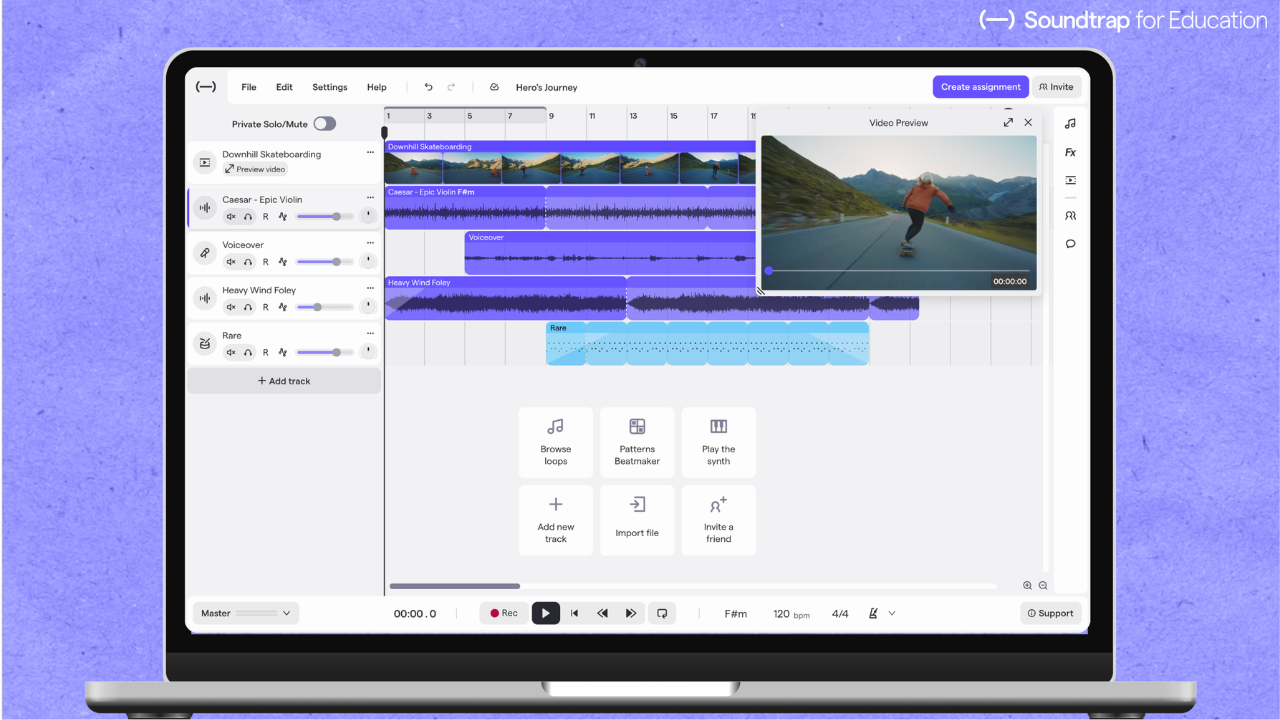
Video Scoring lets students compose music directly to picture in Soundtrap’s browser-based studio. It runs on any school device, including Chromebooks, and there’s nothing to install.
Every account comes with a curated video library built right into the studio: students choose a clip, place it on the timeline, and build their score from Soundtrap’s loops, instruments, and effects, or record narration and their own Foley on top.
A resizable preview window keeps the music locked to the picture as they work, and finished projects export as MP4 files. Schools that want to score their own footage can also enable video import, an optional setting that stays off until it is enabled by the school’s account owner.
Close reading, answered with sound
The reason this works in any classroom is simple: you can’t score a scene you don’t understand. Choosing music for a specific moment means deciding what that moment means. It’s close reading, answered with sound instead of text. Soundtrap for Education’s loop library means that music theory, notation, or instrument skills aren’t necessary to get going; every student can create a score in their first lesson.
One feature, every subject
In literature lessons, students can score a scene from the class novel or write a leitmotif for a character, which shows quickly whether a student has grasped tone and mood. In science or geography, students score and narrate a nature documentary clip, and the narration carries the subject knowledge. History students might compose themes for historical figures and defend their choices. Media studies groups can design sound for short-form video or cut a film trailer, and music technology students get to practise a real creative-industry craft: scoring to picture.
Whatever the subject, a scored video is evidence of learning you can see and hear.
Ready to teach from day one
None of it needs planning from scratch, either. Video Scoring ships with ready-to-teach lesson plans. There’s also a new sound pack full of classic film-score sounds to make getting started easy. Teachers can create assignments, review student work, and leave feedback with the same Soundtrap assignment tools they already use, and students can collaborate live on any video scoring project.
Get started through Skolon
Skolon gathers your school’s digital tools in one place with single sign-on, so students go from logging in to composing in a couple of minutes, with no new passwords and nothing new to remember. Set the scene for your class, and they’ll tell you what it means, in sound.
This is Skolon – we gather the best digital educational tools and make them work in the classroom.
Skolon is an independent platform for digital educational tools and learning resources, created for both teachers and students. With Skolon, accessing and using your digital educational tools is easy – security increases, administration decreases, and there’s more time for learning.
The digital educational tools come from both small and large providers, all of whom have one thing in common – they create digital educational tools that are beneficial for the school environment.
Information
Share this story
Subscribe
Picture a class of eleven-year-olds at the end of a novel.
Instead of writing an essay, each pupil picks a short film clip and scores it to capture how the main character feels in the final chapter.
Twenty minutes later the room hums with uneasy strings, hopeful piano, and home-made footsteps recorded at a desk. The class has produced twenty unique interpretations of the same character’s emotional state, and every one of them shows how well that pupil has comprehended the book. This is Video Scoring, newly launched in Soundtrap for Education.
What is video scoring in the classroom?
Video Scoring lets students compose music directly to picture in Soundtrap’s browser-based studio. It runs on any school device, including Chromebooks, and there’s nothing to install.
Every account comes with a curated video library built right into the studio: students choose a clip, place it on the timeline, and build their score from Soundtrap’s loops, instruments, and effects, or record narration and their own Foley on top.
A resizable preview window keeps the music locked to the picture as they work, and finished projects export as MP4 files. Schools that want to score their own footage can also enable video import, an optional setting that stays off until it is enabled by the school’s account owner.
Close reading, answered with sound
The reason this works in any classroom is simple: you can’t score a scene you don’t understand. Choosing music for a specific moment means deciding what that moment means. It’s close reading, answered with sound instead of text. Soundtrap for Education’s loop library means that music theory, notation, or instrument skills aren’t necessary to get going; every student can create a score in their first lesson.
One feature, every subject
In literature lessons, students can score a scene from the class novel or write a leitmotif for a character, which shows quickly whether a student has grasped tone and mood. In science or geography, students score and narrate a nature documentary clip, and the narration carries the subject knowledge. History students might compose themes for historical figures and defend their choices. Media studies groups can design sound for short-form video or cut a film trailer, and music technology students get to practise a real creative-industry craft: scoring to picture.
Whatever the subject, a scored video is evidence of learning you can see and hear.
Ready to teach from day one
None of it needs planning from scratch, either. Video Scoring ships with ready-to-teach lesson plans. There’s also a new sound pack full of classic film-score sounds to make getting started easy. Teachers can create assignments, review student work, and leave feedback with the same Soundtrap assignment tools they already use, and students can collaborate live on any video scoring project.
Get started through Skolon
Skolon gathers your school’s digital tools in one place with single sign-on, so students go from logging in to composing in a couple of minutes, with no new passwords and nothing new to remember. Set the scene for your class, and they’ll tell you what it means, in sound.
This is Skolon – we gather the best digital educational tools and make them work in the classroom.
Skolon is an independent platform for digital educational tools and learning resources, created for both teachers and students. With Skolon, accessing and using your digital educational tools is easy – security increases, administration decreases, and there’s more time for learning.
The digital educational tools come from both small and large providers, all of whom have one thing in common – they create digital educational tools that are beneficial for the school environment.
Share this story
Subscribe